MediaBridge
Self-hosted S3 file management platform
MediaBridge is a self-hosted file management layer over S3 for teams that need to upload, browse, and serve files across multiple buckets without AWS console access, without IAM credentials distributed to individuals, and without any direct exposure to S3 internals. Each bucket has its own credentials, access controls, CloudFront configuration, and root path confinement, all managed centrally. The server decides everything: menus, bucket lists, folder boundaries, and permissions all come from the backend; the frontend renders exactly what it receives and nothing more. The system is wired to 33 production S3 buckets via Lambda event notifications, which handle thumbnail generation, cache eviction, and archive restore detection in real time.
What it does
Multi-Bucket Access Control
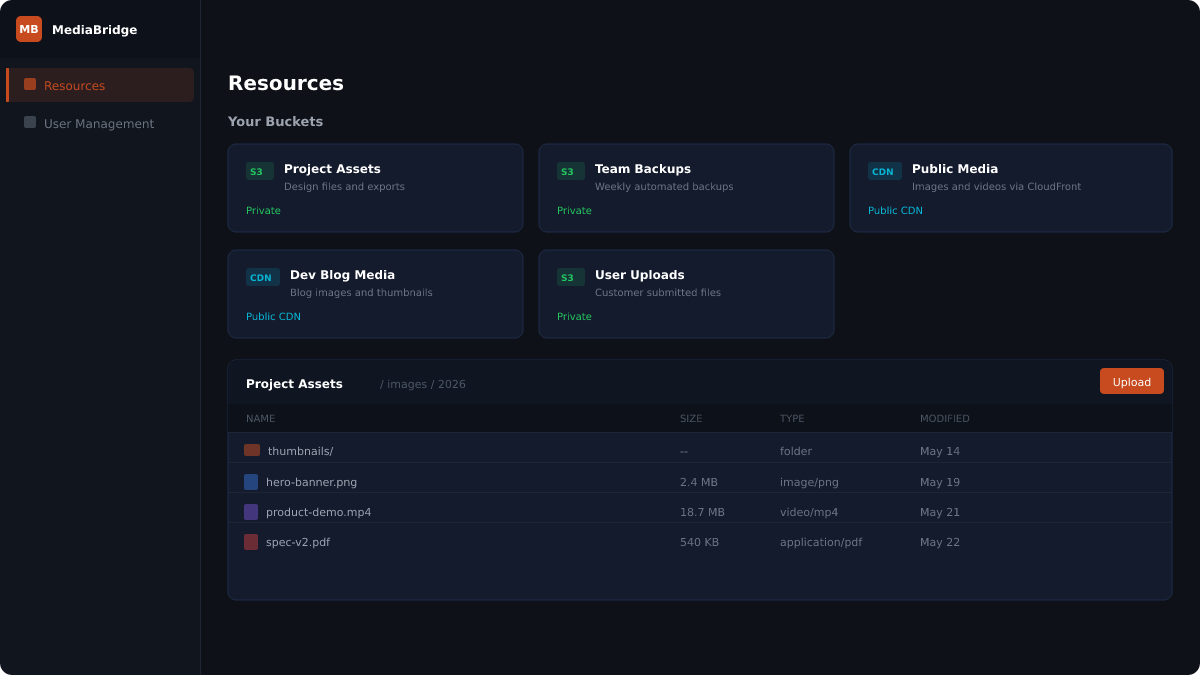
Each S3 bucket is registered with its own IAM credentials, CloudFront configuration, display name, and root path. Admins assign users to specific buckets and control delete permission per assignment independently. Users see only the buckets they are assigned to. AWS credentials, bucket names, and S3 paths never leave the server. A user with access to one bucket has zero visibility into others even if they share the same AWS account.
File Browser with Smart Caching
File listings are served from a local metadata cache rather than hitting S3 on every page load. On a cache miss, the server paginates through S3 ListObjectsV2 to completion and stores the result. Browse data feeds directly into the search engine: folders you have already opened are pre-indexed, so the next search skips those S3 round trips entirely. The file browser supports inline preview (images, video, and PDFs render natively in-page without opening a new tab), grid and list view toggle, bulk select with bulk delete, and virtual folder creation that exists in the UI only until the first file is uploaded into it.
Direct-to-S3 Upload
Files travel from the browser straight to S3. The MediaBridge server is never in the upload path. The backend generates a presigned PUT URL with content-type and content-length-range constraints baked into the signature, so S3 enforces the 25MB file size limit itself at the infrastructure level regardless of what the client sends. Multiple files upload in parallel with per-file progress bars. Before the presign request is made, the frontend checks for filename collisions in the current folder and prompts for explicit confirmation before any overwrite proceeds.
Streaming DFS Search
Search runs over WebSocket and streams results folder by folder as the engine walks the tree. No waiting for a full scan to complete before seeing anything. The traversal engine uses a LIFO task queue with up to ten concurrent workers doing depth-first S3 listing. Each folder is tracked with two independent flags: is_listed (direct contents cached from a previous browse) and is_complete (entire subtree including all descendants fully cached). Once a subtree is marked complete, all future searches read from SQL with zero S3 calls. Completeness is shared across users: one person doing a full traversal makes every subsequent search instant for everyone with access to that prefix.
Global Cross-Bucket Search
From the bucket grid, before entering any individual bucket, a single search query fans out across all accessible buckets simultaneously. One WebSocket per bucket opens in parallel, each running the full DFS traversal engine independently. A live status bar shows which folder each worker is currently scanning across all buckets at once, giving real-time visibility into the work in progress. Results from all buckets stream into a unified view as they arrive, with grid and list modes, inline preview, and click-to-navigate directly from a folder result into that folder in the file browser.
S3 Archive Restore Automation
When any user or process accesses an archived S3 object (Glacier or Deep Archive), the full restore pipeline fires automatically with no human intervention at any step. CloudTrail captures the access attempt, EventBridge routes the event to a Lambda, which calls MediaBridge to log the request. MediaBridge crons trigger RestoreObject on AWS, send a pre-notify email when the restore is initiated, and send a completion email when AWS fires ObjectRestore:Completed via a second Lambda. Notifications are batched per user with a 120-second debounce window: hitting 44 archived files at once produces one email listing all of them, not 44 separate messages. A 23-hour polling backstop handles the edge case where AWS never emits the completion event. The full pipeline is visible in the admin UI as a four-step card: user identified, restore initiated, file restored, user notified.
Lambda Thumbnail Pipeline
A single combined Lambda handles both thumbnail generation and cache eviction, connected to 33 S3 buckets via ObjectCreated and ObjectRemoved event notifications. Image files get a 400x300 JPEG thumbnail generated via Sharp at quality 85. Non-image files (PDF, Word, Excel, video, audio, archive, code) get a colour-coded SVG icon matching the file type, served directly without rasterisation. On file delete, the corresponding thumbnail is deleted automatically. The same Lambda fires cache eviction on MediaBridge for every external S3 change, whether from rclone, CLI, AWS console, or any other source, so the file browser always reflects the actual bucket state regardless of how files got there.
Zero-Tolerance Security Model
Every request is validated against the user's assigned root path on the server. Any path that steps outside the assigned boundary (path traversal, encoded slashes, anything) triggers immediate force logout: the account is blacklisted, all active JWTs for that user are invalidated server-side before their natural expiry, and the frontend is redirected to login. Refresh token rotation includes reuse detection: if a consumed token is presented again, it indicates interception, and the account is force-logged out instantly. AWS credentials are encrypted at rest with AES-256-CBC. S3 buckets are locked behind CloudFront Origin Access Control with no direct public access to the bucket at any time.